
What Is a Printer Developer Unit and How Does It Actually Work
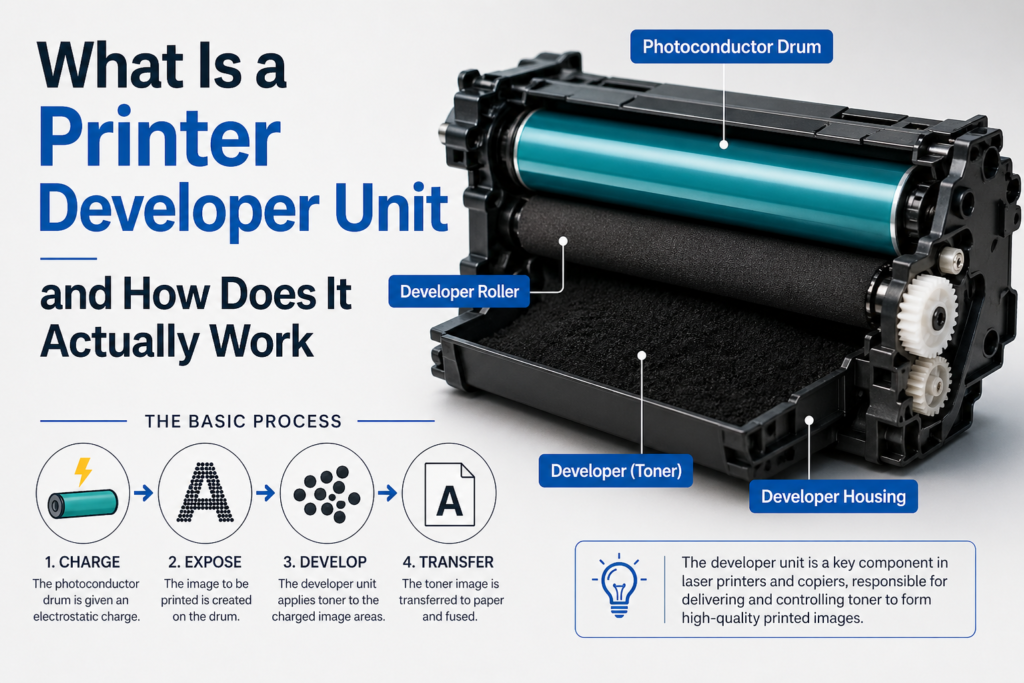
Ever wondered how your printer turns a simple digital file into a clean, sharp page in seconds? Inside every laser printer, there is a small but powerful component doing most of the work behind the scenes. It is called the developer unit. Many people are unaware of it, yet it plays a significant role in print quality.
In this guide, you will learn what a printer developer unit is, how it works, and why it matters. We will keep it simple, clear, and easy to understand.
What Is a Printer Developer Unit
A printer developer unit is a vital component inside a laser printer or copier that ensures sharp and high-quality prints by applying toner powder precisely onto the image before it transfers to paper. In simple terms, the printer first creates an invisible electrostatic image, and the developer unit brings that image to life by evenly placing charged toner onto the correct areas. This process is what makes text and graphics clear, bold, and professional. Without a properly working developer unit, prints can appear faded, uneven, or even completely blank, making it an essential part for consistent print performance and reliability.
What Does the Developer Unit Do
The developer unit plays a critical role in the printing process by working closely with toner to deliver consistent, high-quality output. Toner is a fine powder used in laser printers, and the developer unit is responsible for controlling how this powder is prepared, managed, and applied during each print cycle. It ensures that toner is delivered with precision, allowing text and images to appear sharp, clean, and professional on every page.
Here is what it does in simple terms:
- It receives toner from the toner cartridge and regulates the flow for a consistent supply.
- It charges the toner particles to ensure they are attracted to the correct areas of the image.
- It spreads toner evenly on a special roller to maintain smooth and uniform coverage.
- It transfers toner onto the drum where the image is formed with high accuracy.
This process must be highly accurate and well-balanced, as even a small issue in toner distribution or charging can lead to faded prints, streak lines, background shading, or overall poor print quality.
Main Parts of a Developer Unit
To fully understand how a developer unit works, it is important to know its core components. Each part plays a specific role in controlling toner flow and ensuring consistent, high quality print output. Do not worry, we will keep it simple and easy to follow.
1. Developer Roller
This is the primary roller inside the developer unit and one of the most important components. It picks up toner from the supply area and spreads it evenly across its surface, ensuring smooth and uniform toner distribution for accurate image development.
2. Magnetic Core
Located inside the developer roller, the magnet in the lower pressure roller system helps control how toner particles attach to the roller surface. It plays a key role in maintaining the correct toner density and ensuring precise placement during the printing process. It also stabilizes the magnetic field required to distribute toner evenly across the roller, which supports smooth and consistent operation of the lower pressure roller mechanism. This results in improved print quality and helps reduce common issues such as patchy coverage, uneven output, and inconsistent density across printed pages.
3. Doctor Blade
The doctor blade is a thin, precision component that regulates the amount of toner on the developer roller. It ensures that only a consistent, fine layer of toner remains on the roller, which is essential for clean, sharp, and professional print quality.
4. Toner Supply Area
This is the section where toner is stored before being transferred to the developer roller. It ensures a steady and controlled supply of toner, helping maintain consistent performance during continuous printing tasks. It also helps prevent toner clumping or interruptions in flow, which can affect print quality. A well maintained supply area supports smooth operation and long term reliability of the developer unit.
Each of these components works together in a synchronized way to deliver clear text, sharp images, and reliable print quality across every page.
How a Developer Unit Actually Works
To understand the real value of a developer unit, it helps to see how it works within the full printing process. Below is a simple step-by-step breakdown that explains how toner is prepared, applied, and fixed onto paper for clean and professional results.
Step 1: The Printer Creates an Image
The process begins when a laser scans across a rotating drum to form an invisible electrostatic image. This image is created using controlled static electricity, producing charged areas that act as a precise guide for where toner will be applied on the page. This stage is critical because it defines the exact structure and detail of the final print output.
Step 2: Toner Gets Charged
The developer unit then prepares the toner by applying a controlled electrical charge to each particle. This ensures the toner reacts correctly to the charged image on the drum, allowing for accurate placement and crisp, high quality output.
Step 3: Toner Moves to the Roller
Next, toner flows from the supply section into the developer roller. The doctor blade carefully spreads it into a thin, even layer, which is essential for maintaining balanced coverage and avoiding excess buildup that can affect print clarity. A uniform toner layer at this stage directly impacts consistency across the entire printed page.
Step 4: Toner Sticks to the Image
When the roller meets the drum, the charged toner is drawn only to the exact areas where the image exists. This precise attraction ensures clean edges, sharp text, and well-defined graphics without unwanted background marks.
Step 5: Image Transfers to Paper
The developed toner image is then transferred from the drum onto paper as it moves through the printer. At this stage, the design becomes visible in its full form, matching the original digital content with high accuracy.
Step 6: Heat Fixes the Toner
Finally, heat and pressure are applied to bond the toner permanently to the paper surface. This fusing process prevents smudging, enhances durability, and ensures the printed output remains clear and long-lasting.
Proper fusing also improves resistance to fading, ensuring documents remain readable over time.
Developer Unit vs Toner Cartridge
Many people confuse the developer unit and toner cartridge, but they serve different roles while working together to deliver high quality prints. Understanding this difference helps in better printer maintenance and troubleshooting.
Toner Cartridge
- Holds toner powder used for printing
- Supplies a steady flow of toner to the printing system
Developer Unit
- Controls how toner is applied during the printing process.
- Ensures the toner is spread evenly for sharp and consistent output.
In some printer models, the toner cartridge and developer unit are combined into a single assembly for convenience. In others, they are separate components, allowing for more precise control and independent replacement when needed.
Why the Developer Unit Is Important
The developer unit plays a key role in controlling print quality in laser printers. It manages how toner is prepared and applied, which directly affects the final output.
When the developer unit is working properly, it ensures:
- Sharp and clear text on every page
- High quality and detailed images
- Consistent color or solid black coverage without patches
When the developer unit starts to fail, common problems include:
- Faded or light prints that lack clarity
- Vertical or horizontal lines on printed pages
- Uneven toner distribution causing patchy output
- Background shading or unwanted gray marks
Because of these effects, the developer unit is considered a critical part of the printer that directly impacts print consistency, clarity, and overall performance.
Signs of a Faulty Developer Unit
Over time, the developer unit can wear out. Here are common signs to watch for:
1. Faded Prints
If prints look light even with a new toner, the unit may not be applying toner properly.
2. Lines or Streaks
Lines on the page can mean uneven toner distribution.
3. Gray Background
If the page looks dirty or gray, the unit may be over-applying toner.
4. Toner Not Sticking Properly
This can happen if the toner is not charged correctly.
If you see these issues, the developer unit may need cleaning or replacement.
How Long Does a Developer Unit Last
The lifespan of a developer unit depends on the printer model, usage level, and maintenance quality, so it can vary from one device to another. On average, a developer unit lasts between 50,000 and 200,000 pages, with heavy usage environments typically reducing its lifespan, while moderate and well-maintained usage can help it reach the higher end of this range. Most manufacturers also provide an estimated page yield to guide replacement timing and help maintain consistent print performance. In addition, brands like Noor Printer are known in the UAE for offering high quality developer units that deliver reliable performance and long lasting print consistency, making them a trusted choice for users who want durability and strong print output.
Cleaning and Replacement of Developer Unit
A developer unit can sometimes be lightly cleaned to improve its performance, and in services like printers for rent, proper maintenance is very important to ensure smooth and consistent printing output. However, this cleaning should always be done carefully and only when necessary. Essential precautions include turning off the printer before starting, avoiding any contact with sensitive internal components, using a soft and dry cloth, and strictly avoiding water or any liquid cleaners. These steps help prevent internal damage and ensure safe handling of the developer unit. Still, if the unit is heavily worn or already failing, cleaning will not restore its performance, and replacement becomes the only reliable solution.
In most cases related to printer repair, replacement of the developer unit should be considered when print quality does not improve even after changing the toner, when cleaning no longer makes any difference, when the printer shows a developer unit error, or when it has reached its recommended page yield limit. Replacing the developer unit at the right time ensures consistent print quality, reduces recurring faults, and helps protect other critical printer components from unnecessary wear and long term damage.
Tips to Extend Developer Unit Life and Common Myths
Category | Point | Explanation |
Tips to Extend Life | Use High Quality Toner | Low quality toner can damage the developer unit and cause uneven or faded prints. |
Tips to Extend Life | Avoid Overuse | Give the printer short breaks during heavy printing to reduce heat and mechanical stress. |
Tips to Extend Life | Keep the Printer Clean | Dust and dirt can affect toner flow and reduce print performance. |
Tips to Extend Life | Follow Manufacturer Guidelines | Using recommended settings and supplies helps ensure stable and long lasting performance. |
Common Myths | Developer unit is same as toner | This is not true. Both are different parts that work together for printing. |
Common Myths | It never needs replacement | False. The developer unit is a wear and tear part and loses efficiency over time. |
Common Myths | Any toner can be used | Incorrect toner can damage the developer unit and reduce print quality. |
Final Thoughts
The developer unit may be hidden inside your printer, but it plays a crucial role in every single print you produce. It carefully controls how toner is applied onto the drum, ensuring that your documents come out clean, sharp, and professional every time. When it functions properly, it supports consistent print quality and smooth performance across all printing tasks. However, if you start noticing faded prints, uneven output, or loss of clarity, it is important not to ignore these signs, as the developer unit could be the underlying cause. By understanding its function and following basic maintenance practices, you can help extend its life and keep your printer running efficiently for a longer period.